Table of Contents
- QR Code Uses for Restaurants and Small Shops in India (2026): Complete Guide to Digital Menus, Payments, Marketing and Business Growth
- 1. What Is a QR Code and How Does It Work?
- 2. Why Should Small Businesses in India Use QR Codes?
- 3. QR Code for Restaurants: Create a Digital Menu
- 4. UPI QR Code for Small Shops and Retail Businesses
- Important UPI payment safety practices
- 5. WhatsApp QR Code for Customer Communication and Orders
- 6. QR Code for Product Catalogues and Small Retail Shops
- 7. Google Review QR Code: Encourage Genuine Customer Feedback
- 8. QR Code for Digital Visiting Cards and Business Information
- 9. QR Code for Product Packaging and Customer Information
- 10. How to Create and Implement a QR Code for Your Business
- 11. Practical QR Code Ideas for Different Indian Businesses
- 12. Common QR Code Mistakes Small Businesses Should Avoid
- 13. How QR Codes Can Help Small Businesses Grow
- Frequently Asked Questions (FAQs)
- 1. What are the main uses of QR codes for small businesses in India?
- 2. How can restaurants create a QR code menu?
- 3. Is a QR code payment free for small shops?
- 4. Can customers order food using a QR code?
- 5. How can a shop create a WhatsApp QR code?
- 6. Can QR codes help increase Google reviews?
- 7. Are QR codes safe for digital payments?
- 8. Can a small grocery shop use QR codes for home delivery?
- 9. Do QR codes expire?
- 10. Can QR codes be used on product packaging?
- Conclusion
- About the Author
QR Code Uses for Restaurants and Small Shops in India (2026): Complete Guide to Digital Menus, Payments, Marketing and Business Growth
Imagine visiting a restaurant where you can scan a QR code, view the complete menu, check prices and place an order using your smartphone. Now imagine purchasing something from a local grocery shop and paying instantly by scanning a UPI QR code without carrying cash.
These experiences have become increasingly familiar to Indian customers. QR codes are no longer limited to digital payments. They are also helping restaurants, retail shops, grocery stores, salons, boutiques and other small businesses share information, receive orders, promote products and communicate with customers.
For small business owners, QR codes offer a practical way to connect physical shops with digital services. A single printed code can direct customers to a digital menu, WhatsApp business account, online product catalogue, payment page or Google review link.
In this guide, we explain what QR codes are, how Indian small businesses can use them, how restaurants can introduce digital menus, how UPI QR payments work and how shop owners can use QR codes to improve customer engagement and business operations.
1. What Is a QR Code and How Does It Work?
A QR code, or Quick Response code, is a two-dimensional barcode that stores information in a pattern of black and white squares. Customers can scan it using a smartphone camera or a compatible QR scanning application to access the information encoded in the code.
Depending on its configuration, a QR code can open a website, display a digital menu, initiate a WhatsApp conversation, share contact information, open a payment application or direct customers to an online catalogue.
For example, a small restaurant can print a QR code on each dining table. When a customer scans it, the phone opens the restaurant's digital menu. The customer can view food items, descriptions, prices and available options without requesting a printed menu.
Similarly, a clothing shop can place a QR code near its entrance. Customers who scan it can view the latest collection, check product details or contact the shop through WhatsApp.
The main advantage is convenience. Customers can access useful business information without manually typing a website address or searching for the business online.
2. Why Should Small Businesses in India Use QR Codes?
Small businesses often operate with limited staff, time and marketing budgets. Managing customer enquiries, payments, product information and promotions manually can become difficult, particularly during busy business hours.
QR codes help simplify these activities by connecting customers directly to digital information.
Consider a local grocery shop that receives 100 customers daily. The owner may need to answer repeated questions about product availability, accept payments, share business timings and communicate with customers about new offers. By placing QR codes at suitable locations, the shop can make important information available directly through customers' smartphones.
Restaurants can use QR codes to display menus, while retailers can use them to share product catalogues. Service businesses can direct customers to appointment forms or WhatsApp conversations.
QR codes are also easy to distribute. Businesses can print them on shop boards, packaging, visiting cards, receipts, table stands, product displays and promotional materials.
However, a QR code is only an entry point. The website, menu, catalogue or payment experience behind it must be accurate, mobile-friendly and regularly maintained.
3. QR Code for Restaurants: Create a Digital Menu
One of the most practical QR code applications for restaurants, cafés, hotels and food outlets is a digital menu.
Traditional printed menus need to be reprinted whenever prices change or new dishes are introduced. They can also become damaged, outdated or unavailable during busy hours.
A digital menu solves many of these problems by allowing restaurants to maintain their menu online and provide customers with access through a QR code.
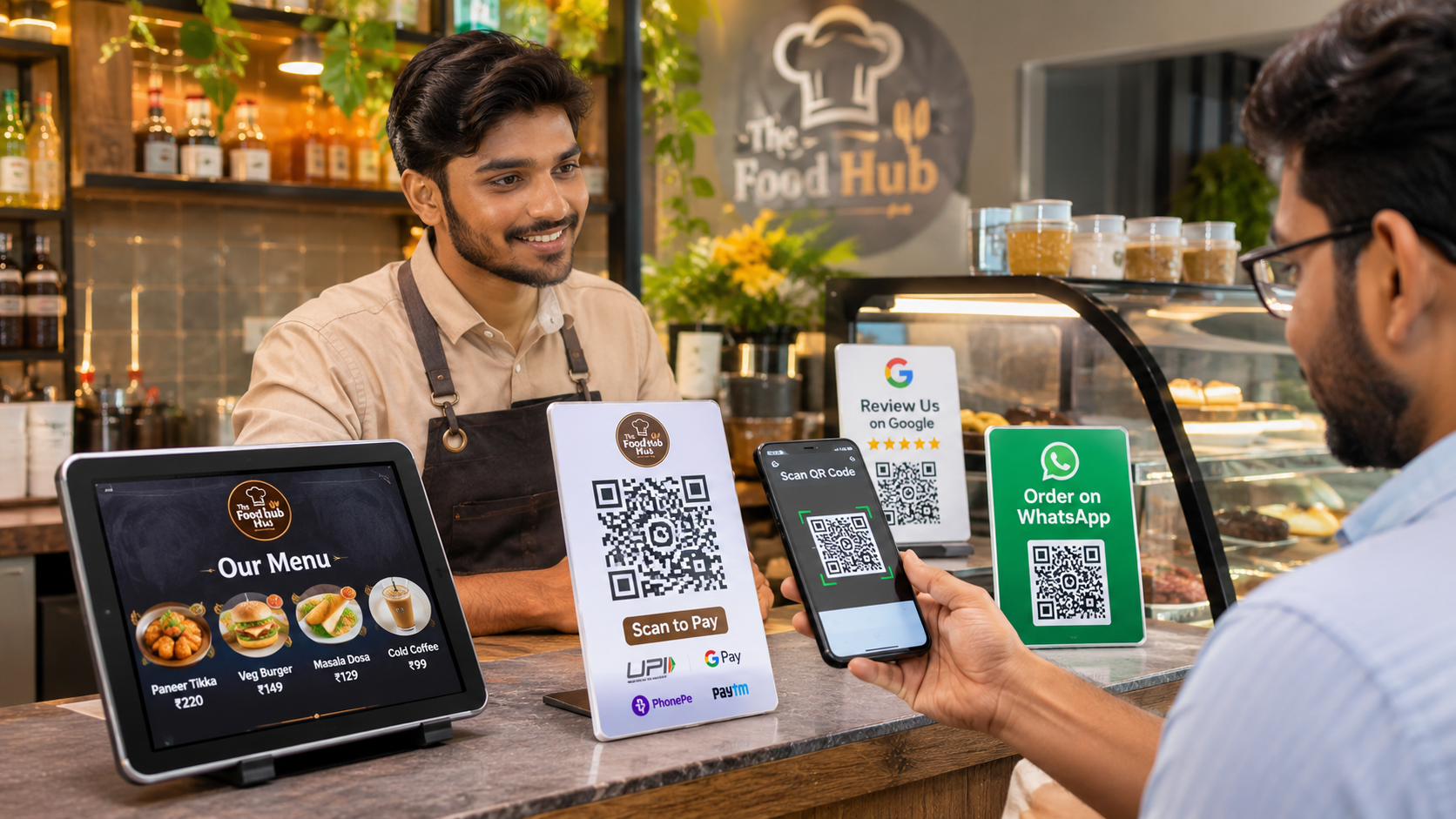
For example, a restaurant in Ahmedabad can place a QR code on every dining table. Customers scan the code and open the restaurant's digital menu, where they can view categories such as starters, main course, beverages, desserts and special dishes.
The restaurant owner can update prices, descriptions and food availability on the digital menu without replacing every printed QR stand.
A useful digital menu should include clear food photographs, readable descriptions, accurate prices, vegetarian and non-vegetarian indicators where applicable, allergen information where relevant and easy navigation on mobile devices.
Restaurants can also use different QR codes for different locations, such as dining tables, takeaway counters and outdoor seating. This makes it easier to understand where customers are accessing the menu.
It is important to remember that a digital menu does not automatically become an ordering system. If the restaurant wants customers to place orders online, it must connect the menu to an appropriate ordering workflow.
4. UPI QR Code for Small Shops and Retail Businesses
Digital payments have changed the way many Indian customers purchase everyday products and services. UPI allows customers to make payments through supported banking and payment applications.
A merchant UPI QR code makes it easier for customers to pay without manually entering the merchant's UPI ID.
For example, a customer purchasing groceries worth ₹850 can scan the shop's UPI QR code, verify the displayed merchant details and amount, and approve the payment through their UPI application.
The merchant can confirm the transaction using the bank or payment application, or an authorised payment confirmation device.
According to NPCI, merchants can accept UPI payments through QR-based integration, and the QR can contain merchant information such as the UPI ID and amount. Merchants generally onboard through an acquiring bank or payment service provider. https://www.npci.org.in/what-we-do/upi/faqs
There are two commonly used approaches.
Static UPI QR Code: A static QR code is generally displayed permanently at the payment counter. Customers scan it and enter the amount they need to pay. It is suitable for small shops, street vendors and businesses where transaction values change frequently.
Dynamic UPI QR Code: A dynamic QR code can be generated for a specific transaction. It may contain the merchant details and payment amount, helping reduce manual amount entry. It is useful for businesses using integrated billing or point-of-sale systems.
Businesses should obtain merchant QR facilities through their bank or authorised payment provider and understand any applicable merchant-category or service charges.
Important UPI payment safety practices
Customers should always verify the merchant name and payment amount before approving a transaction. Merchants should confirm successful payment through their own bank or payment application instead of relying only on a screenshot or an SMS shown by the customer.
A customer does not need to enter a UPI PIN merely to receive money. Never ask customers to share their UPI PIN or OTP. Scanning an unknown QR code or approving an unexpected collect request can expose customers to fraud.
For shops receiving frequent payments, a reliable transaction notification system or payment soundbox can help staff identify successful payments more efficiently.
5. WhatsApp QR Code for Customer Communication and Orders
WhatsApp is an important communication channel for many Indian small businesses. Customers frequently use it to enquire about products, check availability, request prices and place orders.
A WhatsApp Business QR code allows customers to open a conversation with a business by scanning a code.
For example, a bakery can display a WhatsApp QR code near its counter. Customers scan it to enquire about birthday cakes, customisation, delivery availability and pricing.
A boutique can use the same approach to receive enquiries about new collections, sizes and product availability.
WhatsApp Business also supports product catalogues that allow businesses to display products or services with images and descriptions. Customers can browse the catalogue and share their requirements through WhatsApp. https://faq.whatsapp.com/405903568419894/
A business can place its WhatsApp QR code on visiting cards, packaging, receipts, storefront displays and social media promotions. The business should keep its profile updated with the correct name, description, business hours and contact information.
The biggest benefit is that customers can move from discovering a product to asking questions without searching for the shop's phone number.
6. QR Code for Product Catalogues and Small Retail Shops
Retail businesses often have hundreds of products, making it difficult to display every item physically or provide printed catalogues to every customer.
A digital product catalogue can make product discovery easier.
For example, a local electronics shop can create a website containing mobile phones, accessories, specifications, product photographs and available models. A QR code placed at the counter can direct customers to this catalogue.
A furniture showroom can use QR codes beside individual products to display dimensions, materials, available colours and additional photographs.
Similarly, a clothing store can share a digital catalogue containing different collections, product categories and price information.
When creating a digital catalogue, businesses should ensure that product availability and prices are updated regularly. Customers should also be able to contact the business easily when they need additional information.
A QR code linking to an outdated catalogue can create confusion, so the business must maintain the destination page.
7. Google Review QR Code: Encourage Genuine Customer Feedback
Customer reviews can influence whether new customers decide to visit a restaurant, shop or service provider.
A Google review QR code allows customers to open the business's Google review page directly.
For example, a restaurant can place a small review QR stand near the billing counter. After completing their meal, customers can scan the code and share their genuine experience.
A salon can place the QR code near the exit, while a retail shop can include the review link on its receipts.
Google Business Profile provides an option to create a review link or QR code and share it with customers. Google also allows businesses to display the QR code in their stores and include review links in receipts or messages. https://support.google.com/business/answer/16816815
However, businesses must follow Google's review policies. They should not offer discounts, gifts, cash or other incentives in exchange for positive reviews. Reviews should represent genuine customer experiences.
A better approach is to invite all customers to share honest feedback and use their suggestions to improve products and services.
8. QR Code for Digital Visiting Cards and Business Information
Traditional visiting cards contain limited space for contact information. Customers may need to manually save phone numbers, email addresses or website links.
A digital visiting card can make this process easier.
A QR code on a business card can open a digital profile containing the business name, contact number, email address, website, location, services and social media links.
For example, an independent consultant can share a digital visiting card with clients during a business meeting. Customers scan the code and access the consultant's contact details.
Small businesses can also use QR codes on invoices, product packaging and promotional banners to connect customers to their official website or social media accounts.
This is particularly useful for service providers, real estate consultants, freelancers, distributors and small business owners who regularly interact with new customers.
9. QR Code for Product Packaging and Customer Information
Product packaging can also become a useful communication channel.
A QR code printed on packaging can direct customers to product instructions, demonstration videos, warranty information, customer support or additional product details.
For example, a manufacturer of household products can use QR codes to provide customers with an online instruction guide.
Food businesses may also use QR codes to provide supplementary product information, such as ingredients, nutritional information and allergen details.
FSSAI has encouraged food businesses to use QR codes to improve access to product information for consumers, including people with visual impairments. However, its advisory makes clear that adding a QR code does not replace mandatory information that must appear on food labels. https://www.fssai.gov.in/upload/advisories/2023/10/6530e9d74cd4bAdvisory-1.pdf
Businesses must therefore continue to follow applicable food labelling and product disclosure requirements.
10. How to Create and Implement a QR Code for Your Business
Creating a QR code is straightforward, but businesses should first decide what they want customers to access after scanning it.
A restaurant may want to open a digital menu, while a retail shop may want to display a product catalogue. A service provider may prefer a WhatsApp enquiry link, and a shopkeeper may need a merchant UPI QR code.
Start by preparing the destination. This may be a website page, digital menu, WhatsApp Business link, catalogue, Google review page or authorised payment QR facility.
Next, generate the appropriate QR code. For website links, businesses can use a reliable QR generator. For UPI payments, they should obtain the merchant QR code from their bank or authorised payment provider instead of using an ordinary website QR generator.
Before printing, test the QR code using multiple smartphones. Check that it opens the correct destination, loads quickly and works on mobile internet.
Once tested, print the code in a suitable size and place it where customers can easily see and scan it. Avoid placing it behind reflective glass, in dark locations or on surfaces where it may become damaged.
Businesses should also retain the original QR code file so that they can reprint it whenever required.
11. Practical QR Code Ideas for Different Indian Businesses
Different businesses can use QR codes according to their customers' needs.
Business typeUseful QR code applicationRestaurantDigital menu and online orderingCaféMenu, loyalty programme or feedbackKirana shopUPI payment and WhatsApp ordersClothing storeProduct catalogue and new collectionsSalonAppointment booking and service listPharmacyOfficial website and customer informationBakeryProduct catalogue and custom cake enquiriesElectronics shopProduct specifications and supportGrocery storeDigital catalogue and home delivery enquiriesService providerContact details and appointment form
A business does not need to introduce every QR code application at once. It should start with the activity that creates the most convenience for its customers.
For example, a small grocery shop may benefit more from UPI payments and WhatsApp ordering than from building a complicated digital loyalty programme.
12. Common QR Code Mistakes Small Businesses Should Avoid
One common mistake is printing a QR code without testing it. A damaged or incorrect QR code can prevent customers from accessing the intended service.
Another mistake is linking the QR code to an outdated website, menu or catalogue. Businesses should regularly check that the information displayed after scanning remains accurate.
Some shop owners print QR codes that are too small or place them in locations with poor lighting. Customers should be able to scan them comfortably without moving products or asking staff for assistance.
Security is another important consideration. Businesses should protect their payment QR codes against replacement or tampering. Customers should verify the merchant name before approving payments.
Finally, businesses should avoid creating too many unrelated QR codes. A customer standing at a billing counter should immediately understand whether a code is meant for payment, reviews, ordering or another activity.
Clear labels such as "Scan to Pay", "View Menu", "Order on WhatsApp" and "Share Your Feedback" make the experience easier.
13. How QR Codes Can Help Small Businesses Grow
QR codes are useful because they connect offline customer interactions with digital business services.
A restaurant can use a digital menu to make information available without repeatedly printing menus. A grocery shop can use WhatsApp to receive customer enquiries. A clothing store can share new collections through a digital catalogue, while a service provider can simplify appointment enquiries through an online form.
These applications can reduce repetitive manual communication and make it easier for customers to interact with a business.
Businesses can also measure performance when QR codes link to analytics-enabled websites or campaigns. For example, separate QR codes for different shop locations can help identify which locations generate more catalogue visits.
However, scanning activity alone does not guarantee sales. Businesses should also monitor enquiries, completed orders, customer satisfaction and repeat purchases to understand whether their QR strategy is delivering real value.
Frequently Asked Questions (FAQs)
1. What are the main uses of QR codes for small businesses in India?
Small businesses can use QR codes for UPI payments, digital menus, WhatsApp ordering, product catalogues, Google reviews, digital visiting cards, customer feedback and product information.
2. How can restaurants create a QR code menu?
Restaurants can create a mobile-friendly digital menu on a website or menu platform, generate a QR code linking to that menu and display it on tables or at the counter. They should test the code and keep menu prices updated.
3. Is a QR code payment free for small shops?
The cost of accepting payments depends on the payment method, merchant category and provider terms. Businesses should confirm current charges and eligibility directly with their acquiring bank or authorised payment provider. Do not assume every QR-related service or device is free.
4. Can customers order food using a QR code?
Yes. A QR code can open an online ordering page or restaurant ordering system. Customers can view dishes, select items and submit orders if the destination supports ordering functionality.
5. How can a shop create a WhatsApp QR code?
A business can access its QR code through the WhatsApp Business app's business tools or short-link settings. Customers who scan it can open a conversation with the business.
6. Can QR codes help increase Google reviews?
QR codes can make it easier for customers to access a business's Google review page. Businesses should request genuine feedback without offering rewards or incentives in exchange for reviews.
7. Are QR codes safe for digital payments?
Merchant payment QR codes can be used safely when obtained through an authorised provider and checked regularly for tampering. Customers should verify the recipient name and amount before approving payments and should never share their UPI PIN or OTP.
8. Can a small grocery shop use QR codes for home delivery?
Yes. A grocery shop can use a QR code to open its WhatsApp account, product catalogue or order form. Customers can send their shopping requirements and coordinate delivery with the shop.
9. Do QR codes expire?
It depends on the QR code type and destination. A static QR code may continue working as long as its encoded destination remains active. Dynamic QR codes can depend on the service provider and subscription or account settings.
10. Can QR codes be used on product packaging?
Yes. Businesses can use QR codes to provide additional product information, instructions, videos and customer support. However, QR codes do not automatically replace mandatory product-label declarations or other applicable legal requirements.
Conclusion
QR codes provide Indian restaurants, retailers and small businesses with a practical way to connect physical shops with digital services.
From accepting UPI payments and displaying restaurant menus to sharing product catalogues, collecting genuine customer feedback and receiving WhatsApp orders, QR codes can simplify many everyday business activities.
The best approach is to start with one clear business requirement, create a reliable QR code, test it carefully and place it where customers can easily access it.
Small businesses do not need complicated technology to begin. Even a simple QR code linking to a digital menu, business profile or WhatsApp account can improve customer convenience and make everyday operations more organised.
Want to create and manage digital links for your business? Explore i-SPUR Link Bridge to organise business links, share product and service information, and give customers a convenient way to connect with your business through a single digital profile.
About the Author
i-SPUR Editorial Team
The i-SPUR Editorial Team publishes practical educational resources covering digital business tools, QR technology, HR management, payroll, marketing, business automation and workplace productivity. The team aims to help Indian startups, small businesses, retailers, restaurants and entrepreneurs understand useful technologies and apply them to everyday business operations.
Disclaimer: This article is for general educational purposes. UPI payment services, merchant charges, QR acceptance requirements, food labelling and other regulatory requirements may change. Businesses should verify the latest terms with their bank, authorised payment provider and relevant regulatory authorities before implementation.