Table of Contents
- Add Department: Start With a Clear Team Structure
- Designation: Make Job Roles Easier to Understand
- Add Site and Manage Locations: Know Where Work Happens
- Assign Location: Connect Employees With Their Workplace
- Manage Shifts: Organize Different Working Schedules
- Bank: Keeping the Department Setup More Complete
- Why Department Management Matters as a Business Grows
- A Better Way to Think About Department Management
When a company starts growing, managing employees is only one part of the HR responsibility. The next challenge is understanding where those employees belong, which department they work in, what their designation is, where they are located, and which shift they follow. Without a clear structure, even simple HR tasks can become difficult to maintain. Department management gives HR a practical way to organize these details so that the company structure remains easier to understand and manage as the workforce expands.
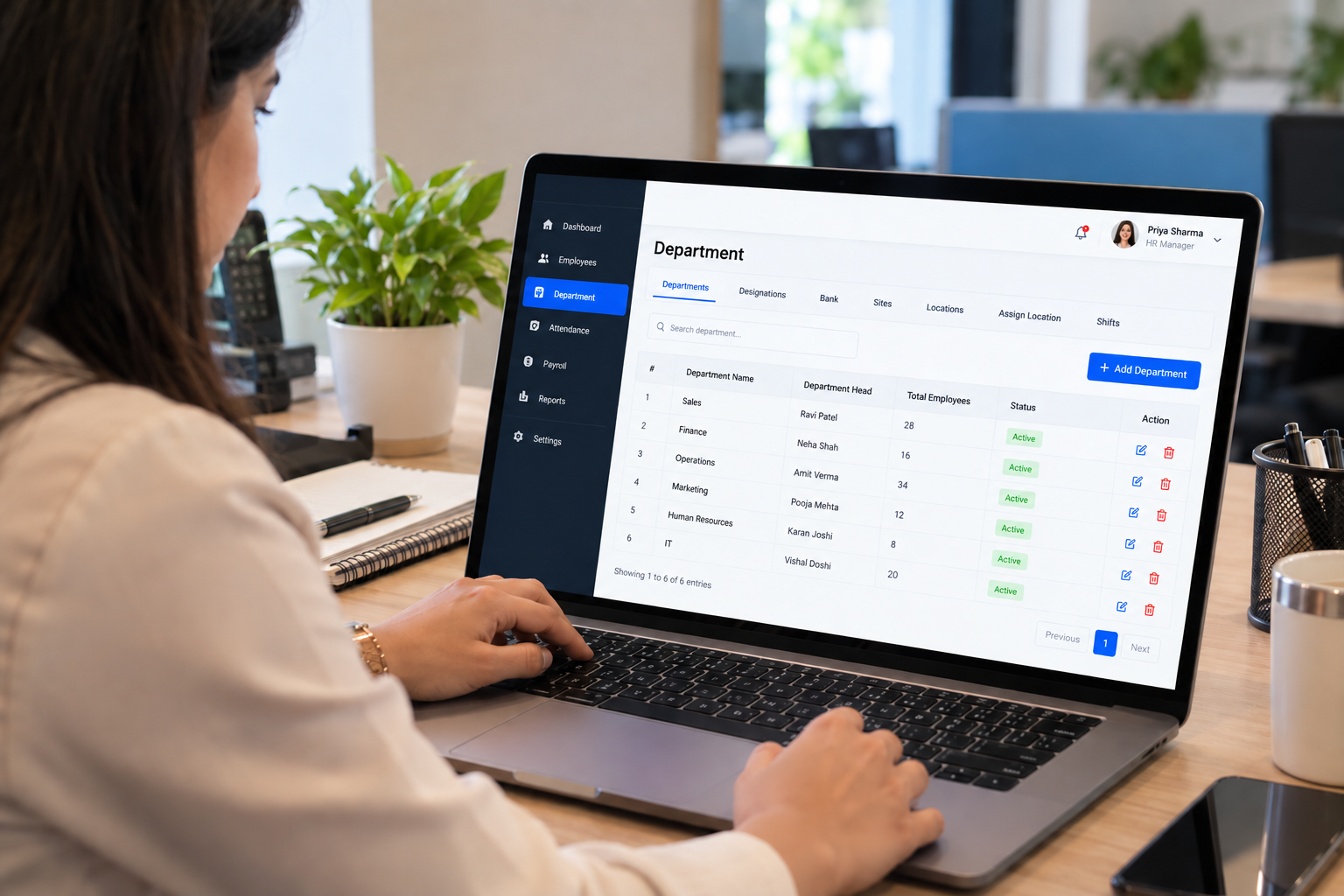
The Department section in HR is not simply about creating department names. It can act as the foundation for connecting people with their working structure. In the system shown here, HR can work with options such as Add Department, Designation, Bank, Add Site, Manage Locations, Assign Location, and Manage Shifts. Each option represents a different part of the organizational setup, helping HR keep important workplace information arranged instead of maintaining it separately across different records.
Add Department: Start With a Clear Team Structure
Every organization has different teams, and those teams need to be clearly defined. The Add Department option gives HR a starting point for creating the departments that represent how the business is actually organized. Whether a company has departments such as Sales, Finance, Operations, Marketing, Administration or Customer Support, maintaining them in one structured place makes employee information easier to understand.
As a business grows, departments can also change. A small company may begin with a few broad teams and later divide them into more specialized functions. Having department information properly maintained means HR does not have to depend on old spreadsheets or manually remember where employees belong.
Designation: Make Job Roles Easier to Understand
A department tells HR where an employee works within the organization, while a Designation helps describe the employee's position or job title. This distinction becomes important when a company has several people working in the same department but performing different responsibilities.
For example, a Sales department may have Sales Executive, Senior Sales Executive, Sales Manager and Sales Head as different designations. Keeping these titles organized helps create a clearer picture of the workforce and makes employee information easier to interpret.
A structured designation list can also help businesses maintain consistency. Instead of having the same position written in slightly different ways across employee records, HR can work with defined designations.
Add Site and Manage Locations: Know Where Work Happens
For businesses operating from more than one office, branch or workplace, employee management becomes closely connected with location management. The Add Site and Manage Locations options shown in the Department section bring this physical side of the organization into the HR structure.
This becomes particularly useful when employees work from different offices or business locations. HR can maintain location information and connect employees with the places where they actually work rather than keeping location details separately.
Modern HR platforms commonly connect departments, designations and work locations because these details help businesses maintain a consistent employee structure across multiple teams and offices.
Assign Location: Connect Employees With Their Workplace
Creating locations is only useful when employees can be associated with them. This is where Assign Location becomes an important part of the department structure.
An employee may belong to the Finance department, have the designation Finance Executive, and work from a particular office location. When these pieces of information are connected, HR gets a more complete picture of the employee's working setup.
This type of structure becomes increasingly useful for organizations with multiple branches, offices or operational sites. Instead of asking where a particular employee is assigned, HR can refer to the structured information maintained within the system.
Manage Shifts: Organize Different Working Schedules
Not every business follows the same working hours. Some organizations operate only during standard office hours, while others have morning, evening, night, rotational or different team-based schedules.
The Manage Shifts option allows HR to make working schedules part of the organizational structure. This is especially relevant when different departments or locations follow different schedules.
Shift management also becomes connected with attendance because employees need to be evaluated against the working schedule assigned to them. HR platforms commonly connect shift configuration with attendance tracking so that working schedules and attendance information can work together.
Bank: Keeping the Department Setup More Complete
The Bank option also appears within this Department section. From the screenshot, the exact fields or workflow available inside this option are not shown, so its detailed functionality should be understood from the actual system configuration rather than assumed from the menu name.
What is important from an HR perspective is the idea of keeping related organizational information within a structured administrative area. When HR information is arranged logically, it becomes easier for HR teams to know where different types of setup information should be maintained.
Why Department Management Matters as a Business Grows
A company's structure changes continuously. New departments are created, employees move between locations, designations change, new work sites are opened and shift requirements can change with business operations. If these changes are maintained manually in different places, keeping employee information accurate becomes harder.
A structured Department section gives HR a central place to maintain the building blocks of the organization:
- Departments define the major teams within the business.
- Designations define positions and job titles.
- Sites and locations identify where employees work.
- Location assignment connects employees with their workplaces.
- Shifts organize different working schedules.
- Bank provides a dedicated option within the available department setup.
These details may look like separate administrative tasks, but together they describe how the organization actually works. Other HR activities can also depend on accurate department, designation, location and shift information.
A Better Way to Think About Department Management
Good HR organization is not only about keeping employee names and records. It is also about understanding the structure behind those employees. Who belongs to which department? What is their designation? Which location are they assigned to? What shift do they follow? These questions become much easier to answer when the underlying HR structure is maintained properly.
That is why the Department section can be viewed as one of the practical foundations of HR operations. Add Department, Designation, Bank, Add Site, Manage Locations, Assign Location and Manage Shifts are not just menu options; they represent the different pieces HR needs to keep the organization clearly defined.
As the workforce becomes larger, having this structure in place can make everyday HR administration more organized, easier to maintain and easier to understand. Instead of trying to reconstruct the company's structure from separate files and conversations, HR can maintain the organization's departments, positions, locations and schedules as part of one consistent framework.