Table of Contents
- How to Set Up a Visitor Management System in an Office in India (2026): Complete Guide
- 1. What Is a Visitor Management System?
- 2. Traditional Visitor Register vs Digital Visitor Management System
- 3. Why Do Indian Offices Need Visitor Management?
- 4. How Does a Digital Visitor Management System Work?
- Step 1: Visitor Pre-Registration
- Step 2: Visitor Registration at Reception
- Step 3: Mobile OTP Verification
- Step 4: Host Notification and Approval
- Step 5: Visitor Pass Generation
- Step 6: Visitor Check-Out
- 5. How QR Code Visitor Management Works
- 6. Visitor ID Verification and Office Security
- 7. How to Set Up a Visitor Management System in Your Office
- 8. Important Features to Look for in Visitor Management Software
- 9. Sample Digital Visitor Register Format
- 10. Visitor Management for Different Types of Businesses
- 11. Visitor Data Privacy and Security in India
- 12. Common Mistakes to Avoid When Implementing Visitor Management
- 13. How i-SPUR Visitor Management Can Help Businesses
- Frequently Asked Questions (FAQs)
- 1. What is a visitor management system in an office?
- 2. Is a visitor management system mandatory in India?
- 3. How does QR-based visitor registration work?
- 4. Is OTP verification enough for visitor security?
- 5. What information should a visitor register contain?
- 6. Can visitors register themselves without a receptionist?
- 7. Can a visitor management system send automatic notifications?
- 8. How can factories use visitor management software?
- 9. How long should visitor records be maintained?
- 10. What is the difference between visitor management and access control?
- Conclusion
- About the Author
How to Set Up a Visitor Management System in an Office in India (2026): Complete Guide
Every day, offices receive visitors for business meetings, interviews, vendor discussions, deliveries, maintenance work and other professional activities. Managing these visits properly is important for maintaining workplace security, improving reception operations and creating a professional experience for guests.
Many Indian businesses still use a traditional paper visitor register at their entrance. Visitors write their names, mobile numbers, company names, purpose of visit and entry time. The receptionist or security guard then calls the concerned employee to confirm the meeting. Although this process may work for a small office receiving a few visitors, it becomes difficult to manage when the number of visitors increases.
Handwritten records can be difficult to read, previous visitor information may be hard to find, and reception teams may not always know whether a visitor has left the premises. Important information can also be exposed when an open register is accessible to other visitors.
A Visitor Management System (VMS) provides a more organised way to manage these activities. It helps businesses register visitors, verify their details, notify employees, issue visitor passes and maintain entry and exit records digitally.
In this guide, we explain how to set up a visitor management system in an Indian office, how QR-based visitor registration works, how to manage OTP verification and visitor passes, and how businesses can improve security through digital visitor records.
1. What Is a Visitor Management System?
A Visitor Management System is a digital solution that helps organisations manage people entering and leaving their premises. It replaces or improves the traditional visitor register by recording visitor information electronically and providing a structured check-in and check-out process.
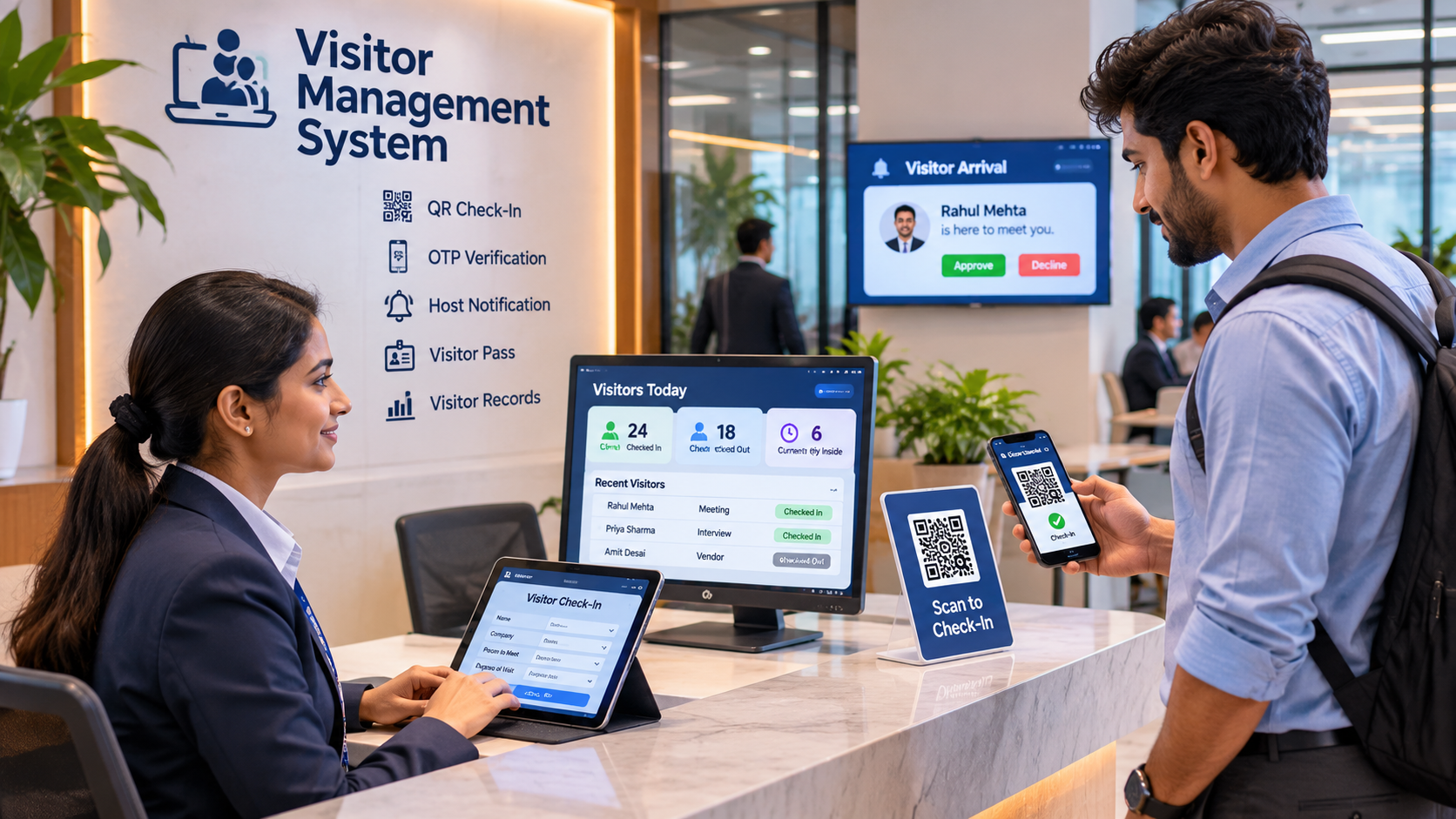
For example, imagine a visitor arriving at an IT company's reception for a meeting with the HR manager. Instead of writing details in a physical register and waiting for someone to answer the reception phone, the visitor can enter their information through a tablet or scan a QR code received before the meeting. The system can verify the mobile number, notify the HR manager and generate a temporary visitor pass.
The receptionist or security team can then confirm the visit and allow entry according to the company's security procedure. When the meeting finishes, the visitor is checked out and the visit record is updated.
This process helps the organisation maintain a reliable record of who visited, whom they met, why they visited and when they entered and exited.
2. Traditional Visitor Register vs Digital Visitor Management System
Traditional visitor registers have been used by Indian offices for many years. They are inexpensive and require very little technical setup. However, they depend heavily on manual entry, handwriting and the receptionist's ability to maintain accurate records.
A digital visitor management system organises the same information in a searchable database. It can also automate registration, host notifications, verification and visitor pass generation.
ComparisonTraditional RegisterDigital Visitor ManagementVisitor registrationManual writingDigital form or QR check-inMobile verificationUsually manualOTP-based verificationHost notificationPhone or intercomAutomated notificationVisitor passHandwritten or printed manuallyDigital or printed passEntry and exitManual registerDigital check-in and check-outRecord searchingManual page checkingSearchable recordsReportsManual preparationAutomated reportsData accessPhysical registerPermission-based digital access
Consider a company receiving 40 visitors in one working day. With a paper register, security staff must review individual entries to identify the visitors who met a particular employee. With digital records, authorised staff can search by visitor name, date, host or company and retrieve the required information more quickly.
A digital system does not automatically make an office secure. It works best when combined with trained security personnel, visitor verification, access permissions and clearly defined entry procedures.
3. Why Do Indian Offices Need Visitor Management?
Visitor management is useful for more than maintaining a record of people entering a building. It helps organisations establish accountability and improve coordination between reception, employees and security teams.
In an IT company, visitors may include job candidates, clients, software vendors, consultants and delivery personnel. In a manufacturing facility, visitors may include contractors, equipment suppliers, maintenance engineers and inspection teams. Each category may require a different registration and approval process.
A structured visitor management process helps reception teams understand the purpose of each visit before granting access. It also helps employees know when their guests arrive, reducing unnecessary waiting time.
Another important benefit is visibility. If management needs to know how many visitors are currently inside the premises, authorised staff can refer to the live visitor register rather than manually checking pages of an entry book.
This information can also support emergency evacuation procedures by helping security teams identify visitors who have not yet checked out. It should be treated as an operational record and not as a replacement for physical evacuation checks.
4. How Does a Digital Visitor Management System Work?
A typical visitor management system follows a sequence of registration, verification, approval, entry and exit.
Step 1: Visitor Pre-Registration
For planned meetings, an employee can register a visitor before their arrival. The host enters the visitor's name, mobile number, organisation, expected arrival date and meeting purpose. Depending on the system, the visitor can receive an invitation through SMS, email or another approved communication channel.
Pre-registration helps reception staff identify expected visitors and reduces the time required for manual data entry.
Step 2: Visitor Registration at Reception
When a visitor arrives without a prior appointment, the receptionist or security guard can register the visitor through a tablet, computer or mobile device.
The registration form should collect only the information required for the visit. Typical fields include visitor name, mobile number, organisation, person to meet, purpose of visit and expected visit duration.
For example, a person arriving for an interview may be registered under the category "Job Applicant", whereas a maintenance engineer may be registered as "Service Vendor".
Step 3: Mobile OTP Verification
OTP verification helps confirm that the visitor has access to the mobile number provided during registration.
The system sends a one-time password to the visitor's registered mobile number. The visitor enters the OTP to complete the verification process.
OTP verification can reduce incorrect mobile numbers and improve the reliability of visitor records. However, it does not independently establish a person's identity. Additional checks may be necessary depending on the nature and security requirements of the premises.
Step 4: Host Notification and Approval
After registration, the concerned employee should receive a notification informing them that their visitor has arrived.
For example, if a visitor comes to meet the accounts manager, the system can send a notification containing the visitor's name, organisation and meeting purpose.
The employee can confirm the meeting or communicate with reception if further verification is required. For restricted areas or sensitive facilities, entry should remain subject to the authorised security approval process.
Step 5: Visitor Pass Generation
Once the visit is approved, the system can generate a temporary visitor pass.
A visitor pass may contain the visitor's name, photograph where justified, visitor ID, host name, entry date and permitted validity period. It may also include a QR code that can be scanned during entry or exit.
The pass should clearly identify the individual as a visitor and should not provide unrestricted access to employee-only areas.
Step 6: Visitor Check-Out
When the visitor leaves the office, reception or security staff should record the exit time.
A proper check-out process ensures that the visitor's status changes from "Inside" to "Checked Out". This helps maintain accurate records and identify visitors who may have forgotten to complete the exit process.
The system can also notify the host that the visitor has left, where such a feature is enabled.
5. How QR Code Visitor Management Works
QR code technology can make visitor registration faster and more convenient, particularly in offices receiving frequent guests.
A unique QR code can be generated for a scheduled visit. The employee or receptionist shares it with the visitor before arrival. When the visitor reaches the office, they scan the code using their mobile phone or the reception's QR scanner.
The QR code can open a visitor registration page containing the relevant appointment information. After the visitor completes the required details and verification, the system can update the registration status.
For example, an employee scheduling a client meeting for 11:00 AM can send a visitor invitation in advance. The client receives a QR-based invitation and scans it at the reception on arrival. The system retrieves the appointment, confirms the relevant information and initiates the host notification process.
A QR code should not be treated as proof of identity or unrestricted entry permission. It should be unique, difficult to guess, time-limited where appropriate and validated by the server before an entry decision is made.
Businesses should also consider visitors who do not have smartphones, have poor internet connectivity or cannot scan QR codes. Reception-assisted registration should remain available as an alternative.
6. Visitor ID Verification and Office Security
Visitor identity verification is an important part of office security. The appropriate verification method depends on the type of organisation, the sensitivity of the premises and the purpose of the visit.
For an ordinary business meeting, a receptionist may verify the visitor's details against the appointment and confirm the host's approval. A restricted manufacturing facility or data centre may require additional checks and escorted access.
Companies should establish a clear policy explaining which identification documents are accepted and when verification is necessary. Aadhaar should not be treated as the only acceptable identity document for every private-office visitor. Avoid routinely collecting or retaining full Aadhaar photocopies when the purpose can be achieved through less intrusive verification.
Where identity details, photographs or other personal information are collected, organisations should explain why the information is needed and restrict access to authorised personnel.
For high-security locations, businesses may also use visitor categories, restricted access areas, temporary credentials, escort requirements and security approval workflows.
7. How to Set Up a Visitor Management System in Your Office
Implementing a visitor management system does not have to be complicated. A business can begin with one reception desk and gradually extend the process to additional entrances or locations.
First, understand your existing visitor process. Identify how visitors currently enter the premises, who records their details, how employees are contacted and how visitor exits are tracked. This helps the organisation identify problems before selecting a digital solution.
Second, define visitor categories. Separate customers, business guests, job applicants, vendors, contractors, delivery personnel and maintenance staff. Different categories may require different information and approval procedures.
Third, decide what information to collect. Create a registration form that captures only the details needed for the intended visit. Avoid collecting excessive personal information simply because a software form provides additional fields.
Fourth, configure the approval process. Decide whether the receptionist, reporting employee, department manager or security administrator must approve each visitor category. Sensitive areas should have additional access controls where necessary.
Fifth, configure notifications and visitor passes. Select the appropriate notification method and define the information that should appear on the visitor pass. Configure validity periods and pass-expiry rules where available.
Sixth, train reception and security staff. Employees responsible for visitor entry should understand registration, identity checks, host approvals, pass issuance and exit procedures. They should also know what to do when the internet or registration system becomes unavailable.
Finally, test the system before full deployment. Run a pilot with actual visitors, check whether notifications reach the correct employees and verify that entry and exit records are accurate. Make necessary changes before extending the system to the entire organisation.
8. Important Features to Look for in Visitor Management Software
A useful visitor management system should support the complete visitor journey rather than only storing registration details.
Pre-registration is important for organisations that receive scheduled visitors because it allows employees to arrange appointments in advance. Walk-in registration is equally important because not every visitor will have a prior invitation.
Mobile OTP verification, configurable ID checks and host notifications help organise the entry process. QR-based check-in can reduce repetitive data entry, while digital visitor passes provide a clear record of authorised visits.
Reporting is another important capability. Management should be able to view visitor entries by date, department, host and visitor category. A live list of visitors currently inside the premises is especially useful for security coordination.
For larger organisations, the system may also need multiple-location management, contractor registration, employee directory integration, access-control integration and role-based permissions.
Businesses should evaluate these features according to their actual requirements instead of purchasing expensive hardware or advanced integrations that they may never use.
9. Sample Digital Visitor Register Format
A digital visitor register should contain enough information to identify and manage each visit without collecting unnecessary personal details.
The following is an illustrative format that an office can customise.
FieldSample EntryVisitor IDVIS-2026-001Visitor NameRahul SharmaOrganisationABC TechnologiesMobile NumberVerified numberPerson to MeetAccounts ManagerPurpose of VisitBusiness MeetingVisit Date02 November 2026Entry Time10:30 AMVerification StatusCompletedApproval StatusApprovedVisitor PassVP-001Exit Time11:45 AMVisit StatusChecked Out
For a real implementation, sensitive fields should be protected, and access should be limited to authorised employees. The organisation should define which information is necessary for each visitor category.
10. Visitor Management for Different Types of Businesses
Different businesses have different visitor-management requirements.
IT companies and corporate offices generally receive clients, interview candidates, consultants and business partners. They benefit from appointment scheduling, host notifications, visitor badges and searchable visit records.
Manufacturing companies and factories may receive contractors, equipment suppliers, maintenance teams and inspection personnel. Their systems may require contractor registration, vehicle details where necessary, safety induction confirmation and controlled access to production areas.
Hospitals and healthcare facilities may need to manage attendants, service providers and authorised guests. These organisations should consider visitor restrictions, department-specific approvals and the sensitivity of personal information.
Educational institutions may receive parents, admission enquiries, vendors and external guests. Appointment scheduling and approval by the concerned department can help organise entry.
Co-working spaces and commercial buildings may need to coordinate visits across multiple companies and tenants. Their systems should support location-specific permissions and ensure that each organisation can access only the visitor information it is authorised to view.
11. Visitor Data Privacy and Security in India
Visitor management systems collect personal information such as names, mobile numbers, photographs and visit details. Businesses must therefore consider privacy and information security when selecting and configuring a digital system.
India's Digital Personal Data Protection Act, 2023 and Digital Personal Data Protection Rules, 2025 establish a framework for processing digital personal data. The Rules provide for phased commencement, so organisations should check which provisions are applicable on the date of implementation and prepare for the upcoming requirements.
A business should clearly explain the purpose of collecting visitor information, identify the data being collected and provide an appropriate privacy notice. Where consent is the applicable legal basis, it should be obtained through a valid process. Businesses should not assume that every visitor record can automatically be collected or retained without considering the applicable legal basis.
Data minimisation is an important principle. If a business only needs a visitor's name, mobile number, host and visit purpose, it should avoid collecting additional information without a clear business or legal reason.
The organisation should also use appropriate security safeguards, such as authorised user accounts, role-based access, secure communication, backups, audit logs and protection against unauthorised access.
Visitor records should have a documented retention and deletion policy. Records required for security investigations, legal obligations or audits may need different treatment from ordinary completed visits. Retention periods should be based on the applicable legal requirements and documented business purpose, rather than keeping all visitor information indefinitely.
12. Common Mistakes to Avoid When Implementing Visitor Management
One common mistake is collecting too much visitor information. Organisations sometimes request multiple identity documents, personal details and photographs even when they are not necessary for the visit. This increases privacy and security risks.
Another mistake is treating OTP verification or QR scanning as complete identity verification. These technologies help with registration and validation, but they do not independently prove that a person is authorised to enter a restricted facility.
Businesses should also avoid allowing visitors to enter before the required host or security approval has been completed. A visitor pass should not automatically provide unrestricted access to every part of the building.
A further issue is forgetting to record visitor exits. An accurate entry record is incomplete if the system cannot establish whether the visitor has left. Reception teams should follow a consistent check-out process and investigate incomplete records.
Finally, organisations should not depend entirely on software. Internet outages, power failures, forgotten mobile phones and QR scanning problems can interrupt registration. A documented manual fallback procedure helps maintain continuity without compromising security.
13. How i-SPUR Visitor Management Can Help Businesses
As organisations grow, managing visitor records manually becomes increasingly difficult. A digital visitor management solution can help bring visitor registration, approval and tracking into a more organised process.
i-SPUR Visitor Management is relevant to businesses looking to digitise office visitor operations and improve coordination between reception, security personnel and employees.
A centralised visitor-management workflow can help an organisation maintain visitor records, manage entry approvals, track check-in and check-out activities and organise visitor information for authorised reporting.
Instead of relying on scattered paper registers and manual communication, businesses can establish a consistent digital process for managing office visitors.
The most effective implementation is one that fits the organisation's actual security requirements, employee workflows and privacy responsibilities.
Frequently Asked Questions (FAQs)
1. What is a visitor management system in an office?
A visitor management system is a digital solution used to register, verify, approve and track visitors entering and leaving an office. It helps maintain visitor records and coordinate entry with the concerned employees and security team.
2. Is a visitor management system mandatory in India?
There is no single general requirement that every private office in India must use a particular digital visitor management system. However, organisations may have applicable sector-specific security obligations, contractual requirements or internal policies. Businesses must also handle visitor personal data in accordance with applicable privacy laws.
3. How does QR-based visitor registration work?
A visitor receives or scans a QR code that opens a registration page or retrieves an appointment. After the required information and verification are completed, the system can initiate host approval and issue a visitor pass.
4. Is OTP verification enough for visitor security?
No. OTP verifies access to a mobile number but does not independently establish a visitor's identity or authorisation to enter a restricted area. Additional checks may be necessary depending on the security requirements.
5. What information should a visitor register contain?
A typical register contains visitor name, contact information where necessary, organisation, person to meet, visit purpose, entry date, entry time, approval status and exit time. Additional information should be collected only where justified.
6. Can visitors register themselves without a receptionist?
Yes. A system can provide self-service registration through a QR code, kiosk or tablet. However, security staff should remain responsible for the required verification and approval procedures.
7. Can a visitor management system send automatic notifications?
Yes. Depending on the software configuration, the system can send notifications through SMS, email or supported applications when a visitor arrives or requires approval.
8. How can factories use visitor management software?
Factories can use visitor management software to register suppliers, contractors, maintenance personnel and inspection teams. They can configure additional approval, safety-induction and restricted-area access procedures according to operational requirements.
9. How long should visitor records be maintained?
The retention period should be based on the purpose of collection, applicable laws, security requirements and documented organisational policy. Businesses should establish a deletion schedule instead of retaining all visitor information indefinitely.
10. What is the difference between visitor management and access control?
Visitor management handles visitor registration, verification, approvals and visit records. Access control determines which people or credentials can enter particular doors or restricted areas. The two systems can be integrated to improve overall premises security.
Conclusion
A well-organised visitor management system helps businesses improve reception operations, maintain visitor records and establish a more consistent office-entry process.
For Indian organisations, the transition from paper registers to digital visitor management can improve registration efficiency, host communication, visitor tracking and reporting. However, successful implementation requires more than installing software. Businesses must define visitor categories, configure approval procedures, train security staff and protect the personal information they collect.
Whether you manage a small office, a growing IT company, a manufacturing facility or a multi-location organisation, a structured visitor management process can make daily operations more organised and accountable.
Want to digitise visitor registration at your workplace? Explore i-SPUR Visitor Management to organise visitor entry, employee notifications, visitor records and office reception workflows through a centralised digital solution.
About the Author
i-SPUR Editorial Team
The i-SPUR Editorial Team creates practical educational resources covering visitor management, HR administration, employee attendance, business operations, workplace security and digital transformation. Its content is designed to help Indian startups, small businesses, corporate offices and growing organisations understand operational challenges and adopt more organised digital processes.
Disclaimer: This article is intended for general educational purposes and does not constitute legal, cybersecurity or data-protection advice. Organisations should review their specific security requirements, sector regulations, contractual obligations and applicable data-protection laws before implementing a visitor management system.